HVAC lead response automation: missed calls, emergencies, and after-hours
Answer first: HVAC leads are urgent — no AC in July, no heat in January, water under the furnace. They call while you're on a roof, not while you're at the desk. The fix is three automations on one platform: instant text-back on missed calls, emergency routing on inbound messages, and after-hours AI that books service calls before morning. Below: the GoHighLevel workflow we wire on live accounts, real cost, week-one expectations, and when to skip it.
Why HVAC loses more leads than most trades
HVAC is a when-it-breaks business. The homeowner isn't comparison shopping over a week — they're sweating through a 95° night or waking up to a frozen house. They call three numbers from Google; whoever answers (or texts back) first gets the $400–$1,200 service call. Everyone else never hears from them again.
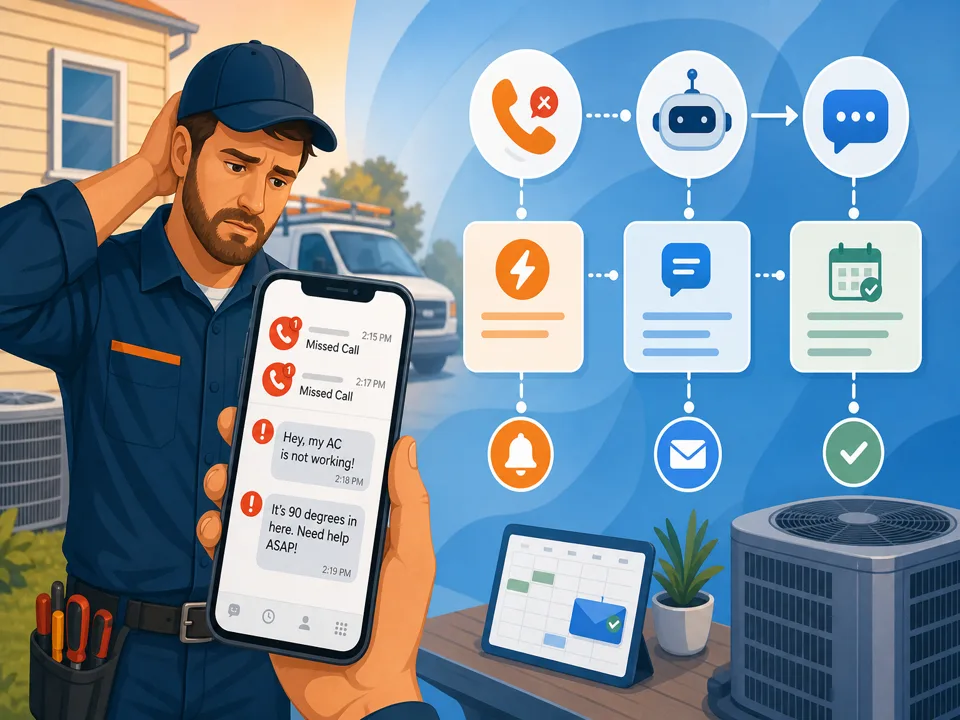
That urgency collides with how HVAC shops actually work: techs on ladders, dispatch juggling three jobs, the owner driving between estimates. Missed calls aren't negligence — they're Tuesday. And after 6pm, weekends, and heat-wave spikes, the phone goes to voicemail while the lead is still holding theirs.
The math is brutal and simple. Miss 15 calls a week, win back 20% with instant text-back, average ticket $350 — that's roughly $1,000/week walking to whoever responded faster. You already paid for the Google listing and the truck wrap; speed is the cheapest lever left.
The three leaks (and which automation fixes each)
Most "HVAC automation" pitches sell one tool. You need three behaviors wired together:
- Missed calls → instant text-back. Caller rings out; they get an SMS in seconds: "Sorry we missed you — is this an emergency (no heat / no AC) or a routine service?" Full build in our missed-call text-back guide.
- Web forms & chat → speed-to-lead. "Free estimate" submissions at 10pm need the same five-minute treatment as phone leads — see why leads go cold in 5 minutes for the form-trigger recipe.
- After-hours → AI or auto-reply that books. When nobody's dispatching, Conversation AI or a tight SMS auto-reply holds the conversation until morning — covered in our after-hours AI guide.
Same platform, same afternoon of setup. Splitting these across three vendors means three logins and gaps at handoff.
Build HVAC lead response in GoHighLevel
We use GoHighLevel because missed-call triggers, SMS, pipelines, calendars, and AI sit on the $97/month Starter plan — tested the same way as our main review. Order matters; this is the sequence we run for HVAC shops.
Week zero: foundation (do this before any workflow)
- Tracking number in, calls forwarding out. Buy a local GHL number, forward to dispatch or the owner's cell. Test a live call — if the trigger doesn't fire, nothing downstream works.
- A2P 10DLC registration — non-negotiable for US SMS. Carriers filter unregistered business texts in production even when testing worked fine. Start brand + campaign registration on day one; approval takes a few business days. Step-by-step in our A2P 10DLC guide.
- Calendar + service types. Diagnostic, maintenance, install estimate — each with real duration and buffer. AI and auto-booking will confidently double-book a 2-hour diagnostic into a 30-minute slot if the calendar lies.
- Pipeline stages. New lead → contacted → booked → completed. Every automation tags the source (missed call, form, after-hours) so you know what's paying back.
Workflow 1 — missed-call text-back (highest ROI)
- Trigger: call status = missed.
- Wait: 30 seconds (filters pocket-dials; still inside the five-minute window).
- SMS: "Sorry we missed you! This is [Company]. Is this an emergency (no heat / no AC) or routine service? Reply 1 for emergency, 2 for routine — or book here: [link]."
- Branch on reply: "1" → tag
emergency, notify on-call tech via SMS + task; "2" → offer next available maintenance slot. - Quiet hours: still send on missed calls — that's when HVAC leads are hottest — but honor STOP and keep messages short.
Workflow 2 — emergency routing on inbound SMS/chat
Not every urgent lead arrives as a missed call. "AC blowing warm air, baby in the house" lands in your inbox at 11pm. Use workflow AI (included in GHL plans) to classify inbound text:
- AI action: categorize message — emergency keywords (no heat, no AC, gas smell, water leak) vs quote vs maintenance reminder reply.
- Emergency branch: tag, SMS the on-call number, create high-priority task, send caller a holding message with ETA expectation ("On-call tech notified — we'll call within 15 minutes").
- Non-emergency branch: offer booking link or queue for morning callback.
Workflow 3 — after-hours (when dispatch is closed)
Between 6pm and 7am, layer on top of text-back:
- Conversation AI in suggest mode for one week — review what it would have sent on real after-hours threads before going live (details in after-hours AI).
- After-hours-only rule: AI answers SMS/chat; missed calls still get text-back immediately, Voice AI only if call volume justifies per-minute cost.
- Handoff triggers: angry tone, custom commercial quote, "speak to a person" → notify owner + pause bot.
Workflow 4 — form speed-to-lead
Facebook lead ads, website estimate forms, Google LSA message imports — same pattern:
- Trigger on new contact / form submit.
- Instant SMS + email: one qualifying question ("What system — central AC, heat pump, furnace?") plus booking link.
- Task + notification if no reply in 60 minutes.
- Stop sequence on reply or booking.
What it actually costs (with usage, not fluff)
On GoHighLevel Starter ($97/month):
- Local tracking number: ~$1.15/month.
- SMS: ~$0.0083 per segment sent (a typical text-back + one follow-up ≈ $0.02 per missed call).
- Conversation AI: add-on, billed per usage — verify on your plan; worth it when after-hours booking volume is real.
- Voice AI: per-minute on top — trial after-hours only before committing.
An HVAC shop missing 50 calls/month and texting each once spends under $5/month on SMS atop the platform. Standalone "HVAC AI receptionist" products charge $200–$500/month for a slice of this. The tradeoff: you configure it once (or pay for done-for-you setup).
Week one: what you should have live
Realistic timeline on a live account:
- Day 1: number forwarding tested, A2P registration submitted, missed-call workflow drafted.
- Days 2–4: waiting on carrier approval; turn on email-only auto-reply on forms meanwhile.
- Day 5 (approval landed): missed-call text-back live, emergency tags + on-call SMS notifications wired.
- Week 2: form speed-to-lead + after-hours AI in suggest mode.
- Week 3: Conversation AI live after-hours only; measure booked jobs attributed to automation tags.
Measure one number: median time to first response — under one minute automated, under fifteen minutes human on emergencies. If that's true, you're beating 90% of local HVAC competitors.
When HVAC lead automation is the wrong fix
Skip the build if:
- You get fewer than ~20 leads/month — a dedicated dispatcher returning calls manually may be enough.
- A human already answers every call 24/7 — you solved it; text-back is only overflow insurance.
- Your calendar and pricing in GHL are wrong — fix data before AI quotes or books.
- You're commercial-only with $50k bid cycles — bespoke follow-up beats auto-SMS; use tasks, not bots.
- Nobody monitors the inbox — automation that never hands off to a human burns trust on the exact emergencies you need to win.
Honest ceiling: text-back wins back 10–30% of missed callers; speed-to-lead lifts form conversion; after-hours AI books while you sleep. None replace showing up on time — they stop the lead from hiring the next company on Google before you call back.
Wire it for your HVAC shop
Do it yourself: start a GoHighLevel trial, submit A2P on day one, and build Workflow 1 (missed-call text-back) first — it's the highest-ROI piece and pairs with the step-by-step text-back guide.
Have us do it: number, A2P, emergency routing, after-hours AI, and form speed-to-lead — tested with real calls — part of every done-for-you setup for HVAC and home-service clients.
Get the GHL Setup Checklist — free
The exact checklist we run for paying setup clients: 27 steps from empty account to booked appointments, including the A2P compliance items everyone forgets. Drop your email and read it right away.
No spam, no sequence-of-doom. We only email when we publish something worth your time. Privacy policy.